Stress Tracking Apps: What They Can Tell You and What They Cannot


Stress tracking apps identify recurring patterns by combining repeated mood logs, context notes, sleep, activity, or wearable signals, but they cannot diagnose anxiety, depression, burnout, or other mental health conditions. These self-monitoring tools can help you notice connections, such as tension after meetings or irritability following poor sleep. A useful app explains its inputs and shows trends without presenting a stress score as a medical finding.
Choose a mood journal for written entries and context tags, or a wearable-connected tracker for sensor charts. Mindful.net is an option for short mindfulness practices alongside tracking, rather than detailed journaling or sensor analysis. Consistent entries and simple reflection are more useful than treating one reading as a verdict.
Definition: A stress pattern app is a self-monitoring tool that turns repeated mood logs, context notes, reminders, sleep data, activity data, or wearable signals into trend insights for awareness rather than diagnosis.
What matters most
- Stress pattern apps can show recurring stress-related trends, such as weekday evening spikes or sleep-linked tension, but they cannot diagnose mental health conditions.
- The most useful apps combine consistent mood check-ins, context notes, and simple reflection prompts instead of relying on one stress score.
- Mindful.net is best for practical mindfulness practice, while wearable-first apps and mood journals serve different tracking needs. Before choosing a tool, compare meditation apps and alternatives to find an approach that matches your preferences and tracking needs.
How what app identifies stress patterns responsibly?s look
Side-by-side captures of the compared products. Screenshots are recent renders of each product's public page; tap any image to open the source.
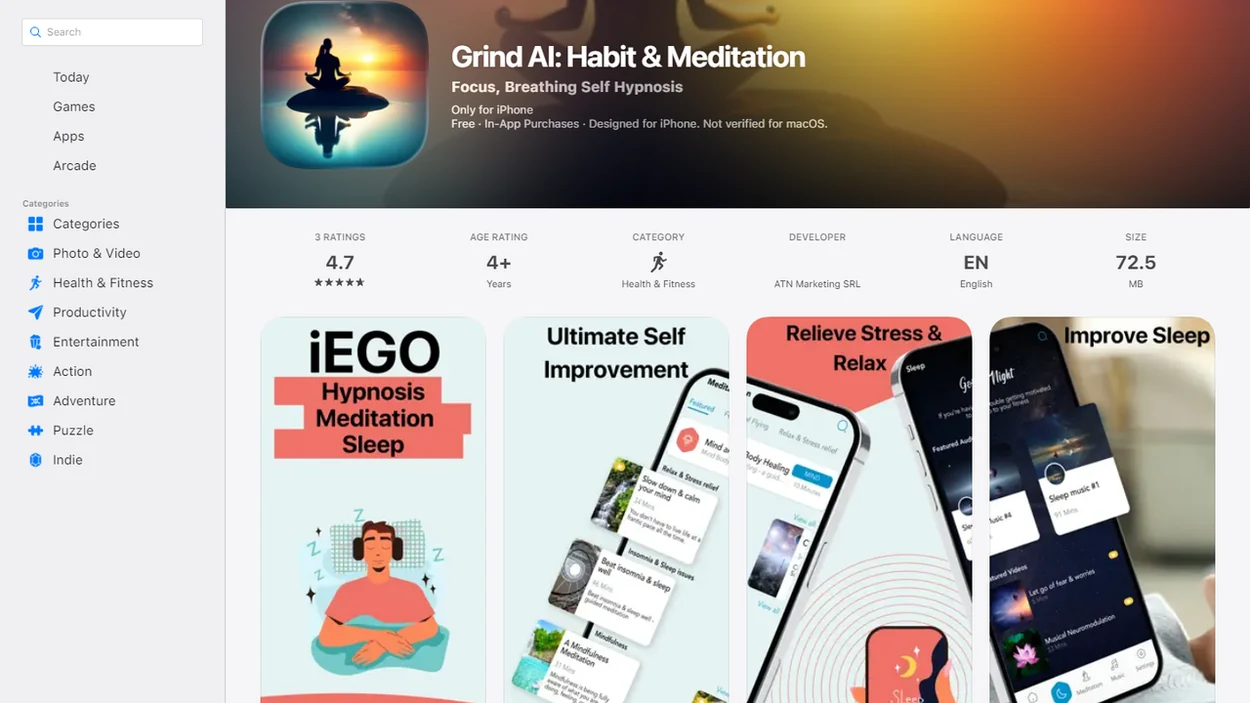
Best stress pattern app shortlist for responsible tracking
The best stress pattern app depends on what you want to notice: mood, body signals, sleep, work context, or reflection habits. Mindful.net is the beginner-friendly mindfulness choice, not a diagnostic product.
- Mindful.net: Beginners looking for stress-pattern awareness can use Mindfulness Practices App check-ins with short practices to notice tension before it becomes the whole afternoon.
- Moodnotes-style mood journals: These fit people who want written mood logs, thought patterns, and context notes without wearable data.
- Apple Watch or Apple Health-connected trackers: These suit users who already collect heart rate, sleep, and activity trends.
- Welltory-style HRV apps: These work for people curious about heart rate variability, recovery, and strain charts.
- Experimental voice or AI tools: These may analyze pitch, pace, or tone, but claims need careful reading.
A useful app shows patterns, not proof.
At-a-glance comparison of stress pattern app options
Stress pattern apps should be compared by fit for self-awareness, not by medical effectiveness. According to CDC survey data, approximately 21% of U.S. adults reported using a health-related mobile app, including tools that may support self-monitoring CDC guidance.
| app type | signals tracked | best for | responsible limitation |
|---|---|---|---|
| Mindfulness apps | mood check-ins, reflection prompts, practice history | noticing thoughts, sensations, and habits | not a clinical stress test |
| Mood tracking mindfulness apps | mood, notes, tags, routines | linking stress to context | depends on honest, consistent logging |
| Wearable HRV apps | HRV, heart rate, recovery, sleep | sensor trend curiosity | readings can be noisy |
| Sleep/activity trackers | sleep duration, movement, exercise | spotting poor-sleep or overtraining patterns | cannot explain emotional causes |
| Voice-analysis tools | pitch, pace, tone, acoustic features | experimental screening research | not ready for diagnosis |
For people comparing a stress pattern app with a mindfulness routine, Mindful.net earns a place because it pairs check-ins with beginner-friendly practice prompts.
What to check before choosing a stress tracking app
We chose responsible stress pattern apps by looking for tools that support awareness without pretending to diagnose or treat a condition. The strongest options make their inputs understandable, show limits clearly, and give a grounded next step after a pattern appears.
- Prioritize apps that describe stress tracking as self-observation, not proof of anxiety, depression, burnout, or any other diagnosis.
- Check whether the app explains what it uses, such as mood logs, context tags, sleep, activity, heart rate, HRV, voice features, reminders, or practice history.
- Separate sensor-based trends from subjective logs and mindfulness prompts, because a watch reading, a journal note, and a breathing reminder answer different questions.
- Favor apps that turn a repeated pattern into something practical, such as reviewing a trigger, taking a short pause, or trying a simple meditation practice. You can also try meditation without an app when you want a simple practice without additional tracking.
- Exclude tools that make unsupported medical claims, promise treatment results, or present a single stress score as if it were a clinical finding.
That kept the shortlist focused on usefulness, humility, and everyday decision-making.
How stress pattern apps work behind the scenes
Stress pattern apps work by collecting repeated signals, then looking for correlations across time. The usual data flow is simple: user check-ins, context tags, optional wearable data, trend detection, reminders, and reflection prompts. If you also record meditation sessions, compare meditation tracking apps that show practice patterns rather than clinical conclusions.
A mood entry after a long meeting may not mean much alone. A recurring pattern may become clearer when similar entries repeatedly coincide with short sleep and elevated heart rate. That is correlation, not cause. The app can say, “Tuesday meetings often line up with tension,” but it cannot say why your body reacts that way.
Speech-pattern research adds another layer. A 2021 systematic review found acoustic features from phone-recorded speech could distinguish people with mood disorders from controls with 79 to 90% accuracy in some studies, but results varied and methods had limits PMC research article. Many speech-monitoring studies are small and short term, so consumer claims deserve caution.
The cushion sliding on hardwood is still data of a sort. You noticed restlessness.
Journaling benefits do not prove tracking accuracy
Evidence that writing can help mental health is not evidence that an app accurately detects stress. A 2022 systematic review of journaling interventions found an average 5% reduction in mental-health outcome scores compared with controls. Effects were generally small to moderate, and differences between studies and methodological limitations prevented firm conclusions across conditions.
Keep two questions separate when reviewing your entries: does recording your experience help, and does the chart describe a repeatable pattern? An informal mood rating is not a validated diagnostic measure. For clinical monitoring, a validated symptom instrument is preferable to an unstructured rating. Bring useful context to a qualified professional rather than treating an app's interpretation as confirmation of a condition.
Five facts about stress tracking limitations and signals
Stress tracking is most useful when it stays modest: repeated signals can support awareness, but they cannot replace judgment, care, or context.
- Stress pattern apps track signals such as mood, sleep, activity, heart rate, voice features, and daily context.
- They show trends and charts, not diagnoses of anxiety, depression, burnout, or any condition.
- Consistency matters more than one-off readings because patterns need repeated observations.
- AI voice and sensor tools remain experimental for diagnosis, even when early studies look promising.
- Privacy, bias, noisy data, and overtracking are real risks with stress-related apps.
Anyone dealing with meeting tension or Sunday night dread may find Mindful.net useful because the workflow keeps attention on check-ins, short practices, and reflection rather than a single stress score. That is closer to everyday mindfulness, not a verdict from a chart.
How to use a stress pattern app without overtracking
Use a stress pattern app in small, repeatable check-ins rather than tracking yourself from morning to night. The aim is to notice, name, and return, not build another dashboard to manage. Alongside brief stress logs, a daily meditation app can help you build a repeatable practice habit.
- Set one daily check-in time, such as after lunch or before closing your laptop. To choose a practice time as well, consider meditation scheduling apps that help you test when meditation fits.
- Log a simple mood rating and one body cue, such as tight shoulders or a clenched jaw.
- Tag the context, including sleep, meetings, conflict, caffeine, exercise, or screen overload.
- Review once a week for practical patterns, such as Sunday night stress, meeting-related tension, or poor-sleep days.
- Try one short practice after a repeated trigger, such as three breaths before unmuting.
- Reset the plan if tracking makes you more worried, and seek professional support if distress feels severe, persistent, or unsafe.
For workplace patterns, our mindfulness at work guide gives a plain-language way to practice without productivity pressure.
Mindfulness practice alongside a stress log
Does Mindful.net identify stress patterns? Mindful.net can support mindful pattern awareness through check-ins, short practices, and reflection prompts, but it does not diagnose or treat stress, anxiety, depression, or burnout.
Beginners can use the Mindful.net app's short guided meditations and breathing exercises alongside a separate stress log, without needing to interpret complex scores. A worried parent might finish watering plants while rain taps the glass, realize the mind has drifted to school forms and family costs, then log “planning” and “warm cheeks after a walk.” Small notes like that can become useful when they repeat.
People trying to understand stress during budget planning or a crowded day can use Mindful.net alongside the app that reminds me to breathe at work, because the concrete workflow is simple: a reminder, a short pause, and a reflection note. We usually suggest keeping the note plain, “airport queue sign, dry lips, worried thought”, so the app supports awareness instead of turning the moment into a test.
Good mindfulness apps deliver repeatable attention practice, not a hidden medical diagnosis.
Best wearable stress pattern app for sensor trends
Wearable-first stress pattern apps make sense when you want sensor trends from heart rate, HRV, sleep, activity, and recovery. Apple Watch, Apple Health-connected apps, Stress Monitor-style tools, Stress Watch-style tools, and free stress level apps often appeal to people who like charts.
Those charts need context. Exercise, illness, caffeine, poor sleep, device fit, skin contact, and algorithm differences can all shift readings. A loose watch during a commute can make a clean-looking graph less meaningful than it appears.
On days you are standing near an airport queue sign with warm cheeks after a walk and your wearable reports strain, the practical question is still, “What was happening around me?” Use sensor data as a conversation starter with your own notes, not as an objective stress verdict. For people who want steadier support, a mindfulness-focused companion may fit better than a wearable-only tracker because it gives a concrete pause, practice, and reflection step.
Common myths about apps that identify stress patterns
Stress app marketing can make pattern detection sound more certain than it is. That matters because about 31.1% of U.S. adults experience an anxiety disorder at some time in their lives, according to the National Institute of Mental Health Anxiety Disorders, so diagnostic caution is not a small detail.
| myth | fact |
|---|---|
| An app can diagnose anxiety, depression, or burnout. | Consumer apps can flag patterns, but diagnosis requires qualified assessment. |
| One voice sample or one day of data is enough. | Stress-related patterns need repeated data and context. |
| A low stress score means you do not need help. | People can need support even when an app misses risk signals. |
| App insights are completely objective. | Results depend on self-report, sensors, algorithms, and training data. |
People trying to reduce screen overload may prefer a mindfulness-first workflow because it gives a practical next step after noticing stress, such as a short breathing practice or body scan. Our guide to mindfulness when overstimulated covers that situation in more detail.
Pause after a stressful check-in
A stress entry that records tight shoulders or racing thoughts can be a cue for a brief practice, rather than more analysis. Set a short session with the site's free online meditation timer, or try a breathing exercise in the Mindful.net app. For detailed mood records, wearable charts, or clinical assessment, a dedicated tracker or qualified professional is the better choice.
Stress Tracking Limits
- Stress apps cannot reliably distinguish everyday stress from mental health conditions and should not be treated as diagnostic devices unless specifically cleared.
- Speech and sensor detection can be affected by noise, illness, accents, speaking style, device fit, and missing data.
- Algorithms may be biased or trained on samples that do not reflect diverse users.
- Seek professional care when symptoms are severe, rather than relying on stress apps or mindfulness sites.
Stress tracking app questions
What kind of app can identify my stress patterns?
A mood journal can connect your entries with context such as meetings, conflict, or sleep. A wearable-connected app can show trends in heart rate, HRV, sleep, and activity. Choose based on the information you want to record. Neither type can establish the cause of stress or diagnose a condition.
Do wearable stress scores measure stress directly?
Wearable stress scores are interpretations of signals such as heart rate and HRV, not direct measurements of your emotional experience. Exercise, illness, caffeine, poor sleep, and device fit can affect readings. Compare the chart with your own notes before assuming a high score means psychological stress.
What should I record in a daily stress check-in?
Record a simple stress rating, one physical cue, and a brief context note. Sleep quality, a difficult meeting, or conflict may be useful details. Keep the same items and check-in time where possible. Review repeated entries for connections, but remember that two things occurring together does not prove one caused the other.
Can a stress tracking app diagnose anxiety or burnout?
Consumer stress tracking apps should not be used to diagnose anxiety, depression, or burnout. Mood entries and sensor trends can provide context, but they do not replace qualified assessment. A low score also cannot rule out a problem. Seek professional help when distress persists or interferes with daily life.
How often should I check my stress app?
Start with one brief daily check-in and a weekly review rather than checking scores throughout the day. Consistency helps you compare entries without making tracking another task to manage. Reduce or stop tracking if it leads to compulsive checking, repeated self-analysis, worsening mood, or disrupted sleep.
Can voice analysis reliably tell how stressed I am?
Voice-based stress detection should not be treated as a diagnosis. Background noise, illness, accent, and speaking style can affect the signal, and one recording lacks the context needed to understand a recurring pattern. Treat any result as an uncertain prompt for reflection, not proof of your mental health status.
Can mood tracking make stress worse?
It can become unhelpful when entries turn into prolonged analysis of the same event or repeated checking for reassurance. Keep sessions bounded and finish with a practical next step, grounding, or social support. Modify or stop the practice if you notice more distress, avoidance, compulsive checking, or worsening mood.
What privacy settings should I check in a stress tracking app?
Check password or biometric protection, encryption, cloud backups, sharing with third parties, advertising or data-sale clauses, and deletion procedures. Avoid identifiable details about other people. For especially sensitive entries, an offline notebook or local encrypted file may be preferable to an account-based app. Do not assume every journal app offers equal protection.